End-to-end example
This page shows the full flow with Tiep UI and a webhook.
The goal:
A professional opens Tiep from the HIS, records the visit, saves the report, and the HIS receives the structured data.
Step 1: create a facility
Every consultation belongs to a facility.
Read onboarding and facilities first.
Step 2: create a webhook
In the platform, open the facility and configure integration settings.
You need:
- Webhook URL.
- Webhook secret.
- Payload type.
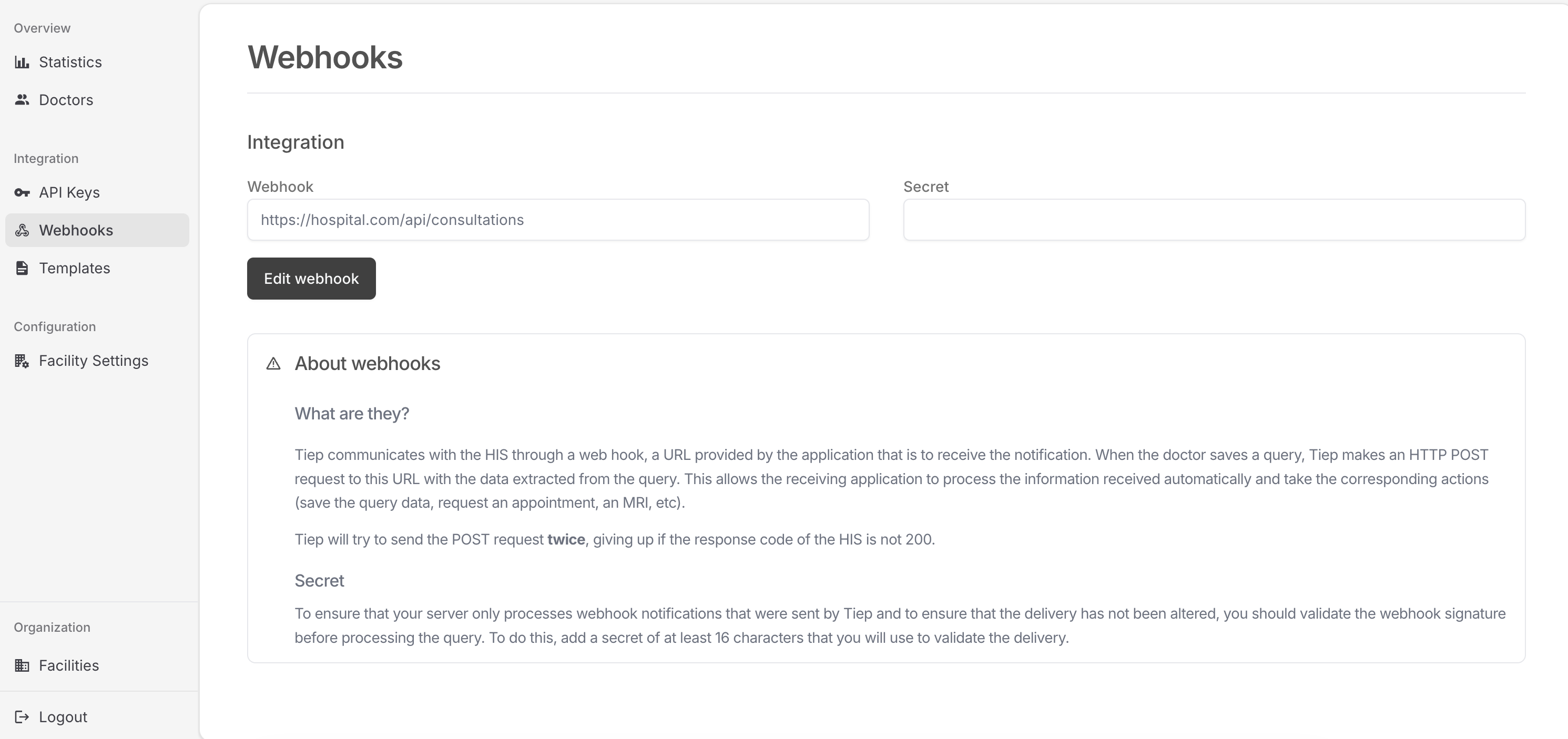
Example webhook URL:
https://his.example.com/tiep/webhooks/consultations
Step 3: generate a launch token
The HIS asks Tiep for a short-lived token. This token lets the professional open Tiep without typing a password.
curl -X POST "https://api.tiep.ai/v1/auth/generate-token" \
  -H "X-API-Key: $FACILITY_API_KEY" \
  -H "Content-Type: application/json" \
  -d '{
    "doctor": {
      "id": "doctor-123",
      "name": "Dr. Anna Smith",
      "specialties": ["Orthopedics"]
    },
    "form": {
      "title": "Anamnesis",
      "type": "object",
      "properties": {
        "reason": {
          "title": "Reason for visit",
          "type": "string",
          "description": "Why the patient came today"
        },
        "pain-level": {
          "title": "Pain level",
          "type": "integer",
          "description": "Pain level from 0 to 10",
          "minimum": 0,
          "maximum": 10
        }
      }
    }
  }'
Response:
{
  "token": "qKaIW2jUWEFT841tP_vMYoswTAXiejtPgqf3sHQ90iY",
  "session_id": "60c478df-2e8d-4317-90af-d801c217a034"
}
Every token gets a session. You do not ask for one, and you do not have to keep the
session_id unless you plan to poll it in step 6.
Naming the patient and episode
You can also tell Tiep who the visit is for, right here:
{
  "doctor": { "id": "doctor-123" },
  "patient": { "internal_id": "MRN-12345" },
  "episode": { "external_id": "EP-2026-KNEE" }
}
The session comes back already linked to both, so the visit is grouped from the very first second. This is the tidiest way to do it. Read patients and episodes for what the registry stores and what your facility must turn on first.
Step 4: build the Tiep URL
The HIS opens Tiep with query parameters.
https://app.tiep.ai/?token=<token>&context=<base64-json>
The token is enough. Tiep already knows which session belongs to it, so the professional lands on the right one without you passing anything else.
The context is patient and visit metadata encoded as URL-safe Base64 JSON.
Read consultation context for every key Tiep understands and what it does.
Minimum useful context:
{
  "patient": {
    "resourceType": "Patient",
    "identifier": [
      {
        "value": "patient-123"
      }
    ],
    "name": [
      {
        "text": "John Smith"
      }
    ]
  },
  "visit_id": "visit-456"
}
Python helper:
import json
from base64 import urlsafe_b64encode
from urllib.parse import urlencode


def build_tiep_url(token: str, context: dict) -> str:
    encoded_context = urlsafe_b64encode(json.dumps(context).encode()).decode()
    query = urlencode(
        {
            "token": token,
            "context": encoded_context,
        }
    )
    return f"https://app.tiep.ai/?{query}"
You may still add &session_id=<session_id> if it suits your system, and it must be the
one from step 3. Tiep uses the session already tied to the token either way, so leaving
it out is the simpler choice.
Whether context is required depends on the facility.
Turn on Require launch context to make Tiep refuse consultations that arrive without it,
and list required context keys to demand
specific fields.
Step 5: receive the report
When the professional saves, Tiep calls your webhook.
Your endpoint should:
- Read the raw request body.
- Verify the signature.
- Store the payload.
- Return
200 OK.
import hmac
import json
from hashlib import sha256


def handle_tiep_webhook(raw_body: bytes, signature: str, secret: str) -> dict:
    expected = "sha256=" + hmac.new(
        secret.encode("utf-8"),
        msg=raw_body,
        digestmod=sha256,
    ).hexdigest()

    if not hmac.compare_digest(signature, expected):
        raise ValueError("Invalid Tiep signature")

    return json.loads(raw_body)
Step 6: poll session status if needed
Use the session_id from step 3 to ask Tiep how the visit is going.
curl "https://api.tiep.ai/v1/sessions/60c478df-2e8d-4317-90af-d801c217a034" \
  -H "X-API-Key: $FACILITY_API_KEY"
Example response after save:
{
  "id": "60c478df-2e8d-4317-90af-d801c217a034",
  "status": "report_saved",
  "created_at": "2026-03-04T09:12:00Z",
  "saved_at": "2026-03-04T09:31:44Z",
  "extraction_count": 1,
  "pending_consultation": false,
  "payload": {
    "context": {
      "doctor_id": "doctor-123",
      "visit_id": "visit-456"
    },
    "payload": {
      "reason": "Shoulder pain after tennis",
      "pain-level": 6
    }
  }
}
Empty fields are left out, so a session that is still running has no saved_at and no
payload.